Friday, May 3, 2024

What is the Design Thinking? Definition, Importance, Examples, and Process

the design process

These insights will help you to achieve the best possible user experience. Visual design is about creating and making the general aesthetics of a product consistent. To create the aesthetic style of a website or app, we work with fundamental elements of visual design, arranging them according to principles of design. These elements and principles together form the building blocks of visual design, and a firm understanding of them is crucial in creating a visual design of any product. The principles of design in art are foundational concepts that guide the creation and evaluation of artworks, ensuring visual harmony, balance, and cohesion.

Brainstorm Design Ideas

Whether you manage a design team, work as a designer, or are part of a team of designers, improving your creation process is key. A well-developed design process helps boost collaboration and reduce workload and resource issues. That means that design thinking is not only for designers but also for creative employees, freelancers, and business leaders. There are multiple design thinking frameworks, each with a different number of steps and phase names.

Learn More about Design Principles

Create a product roadmap to lay the groundwork for tasks and projects the team or project managers will work on. Uber Eats also gathers insights from consumers and delivery agents via fireside chats where users are encouraged to visit the offices and share their experiences. They take a look at logistics like transportation and infrastructure.

Visual Aesthetics

By creating a visual representation of their thought process, designers can identify connections and uncover new insights that can fuel their creativity. Mood boarding involves creating a collage of images, colors, textures, and typography that capture the desired mood and aesthetic of a design project. It helps designers establish a visual direction and serves as a source of inspiration throughout the design process. Each stage of the process has its own timeline, allowing designers to allocate resources and prioritize tasks accordingly. Additionally, the design process creates a strong foundation for successful design outcomes and minimizes the risk of design flaws or usability issues.

User-Centered Design (UCD)

They learn that engineering is about designing creative ways to improve existing artifacts, technologies or processes, or developing new inventions that benefit society. Student pairs experience the iterative engineering design process as they design, build, test and improve catching devices to prevent a "naked" egg from breaking when dropped from increasing heights. To support their design work, they learn about materials properties, energy types and conservation o...

Design Thinking Process Steps & Examples 2024

Since team members may be in different time zones, it's important to maintain a workflow where individuals can contribute at their own pace without delaying the project. Clear documentation and updates in shared tools facilitate this asynchronous work. For example, Spotify's UX design process features the use of personalized content recommendations ("Recommended" in the center of this screenshot). A well-designed, user-friendly interface increases user engagement and satisfaction. Various generated ideas must then undergo a concept evaluation step, which utilizes various tools to compare and contrast the relative strengths and weakness of possible alternatives. A prototype is a simulation that shows how users will interact with the finished product.

In reality, some affect more people, some are more profitable, and some can’t be solved at all. The process is designed to leave no stone unturned to ensure that the intended direction is more likely to create the desired impact. 8, navigation design can organize elements to insert amount, add a description, and requesting transaction to be arranged from top down. Moreover, it can also decide that they live on the same screen so that users can securely double-check all the details of their transaction before confirming.
the design process

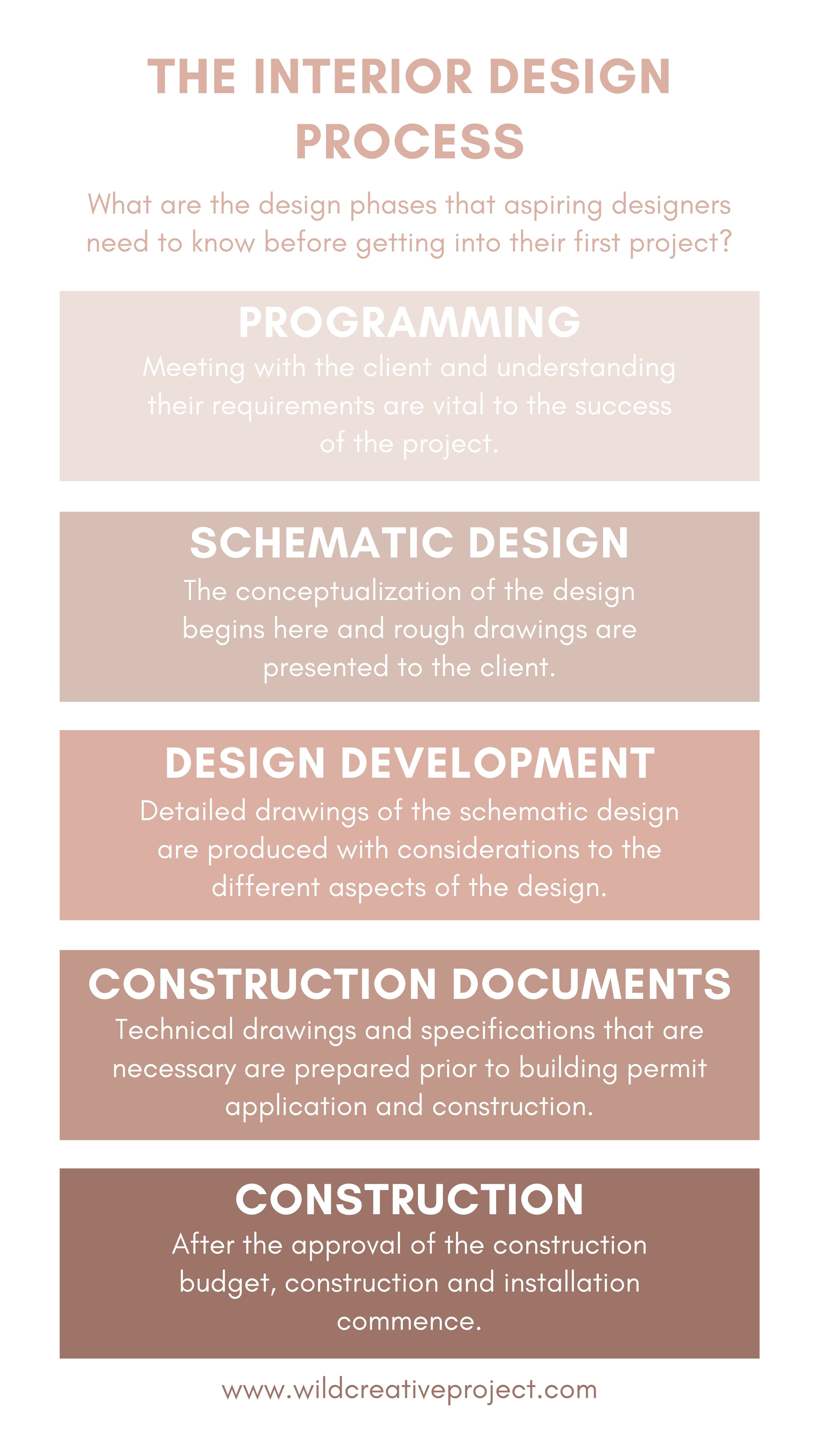
It’s not as easy as mowing through product’s Strategy, Scope, Structure, Skeleton and Surface. The ‘simplified’ design process with which students are familiar is modeled after a typical/academic case study. A design process defines every designer’s journey to solve wicked problems.

Prolight Diagnostics finalises cartridge design - BioStock - Connecting Innovation and Capital

Prolight Diagnostics finalises cartridge design.

Posted: Fri, 26 Apr 2024 07:37:58 GMT [source]

“KISS” (“Keep It Simple Stupid”) is an example of a principle where you design for non-experts and therefore minimize any confusion your users may experience. Design principles are fundamental pieces of advice for you to make easy-to-use, pleasurable designs. You apply them when you select, create and organize elements and features in your work.

During this engineering design/build project, students investigate many different solutions to a problem. Their design challenge is to find a way to get school t-shirts up into the stands during home sporting events. They follow the steps of the engineering design process to design and build a usabl... Students learn about the mathematical characteristics and reflective property of ellipses by building their own elliptical-shaped pool tables.

HCD is a formal discipline with a specific process used only by designers and usability engineers to design products. Design thinking borrows the design methods and applies them to problems in general. In design thinking, teams may jump from one phase to another, not necessarily in a set cyclical or linear order. For example, on testing a prototype, teams may discover something new about their users and realize that they must redefine the problem. For example, teams may jump from the test stage to the define stage if the tests reveal insights that redefine the problem. Or, a prototype might spark a new idea, prompting the team to step back into the ideate stage.

They research how to build and test their trebuchets, evaluate their results, and present their results and design process to the class. Students learn how biomedical engineers work with engineers and other professionals to develop dependable medical devices. Student teams brainstorm, sketch, design and create prototypes of suction pump protection devices to keep fluid from backing up and ruining the pump motors.

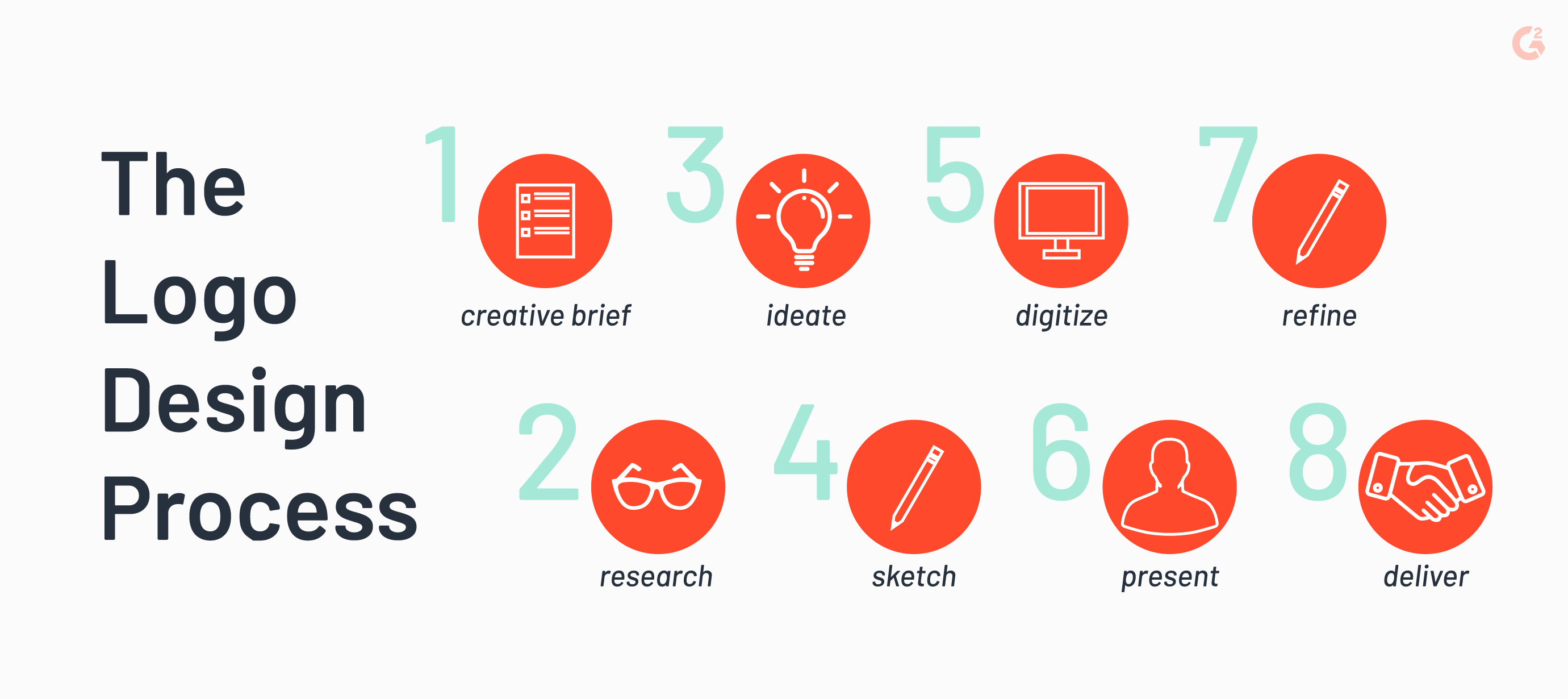
This is when you test your ideas against everything you discovered during your research. This happens when you present to your client, speak to your boss, or examine your project by yourself. You must learn how to use the tools and machines safely before manufacturing your product. Manufacture will use the information in your working drawing and the tools, processes, and materials available in your Technology and Design workshop. You might create a model to help refine how your design looks and operates.

The design thinking process should not be seen as a concrete and inflexible approach to design; the component stages identified should serve as a guide to the activities you carry out. The stages might be switched, conducted concurrently or repeated several times to gain the most informative insights about your users, expand the solution space and hone in on innovative solutions. As a visual designer, you focus on creating pixel-perfect prototypes that are consistent with the rest of the product. In this sense, visual designers focus on the later phases of the design process, in particular the prototype phase. This book presents a collection of key psychological principles that UX designers can leverage to create more intuitive, user-centered products and services. It covers foundational concepts like Fitts' Law, Hick's Law, and the Pareto Principle, providing both the theory and practical applications of these principles.

It examines the psychology of everyday objects and experiences, and highlights the importance of user-centered design. When UX professionals understand how people perceive and engage with the designed world, they can create more intuitive, meaningful, and satisfying digital experiences. This publication is highly influential as it introduced the concept of contextual inquiry, a user-centered design method that involves observing and interviewing users in their natural environment. It has become a cornerstone of the UX design process, helping teams develop a deep understanding of user needs and behaviors. To do user testing well, UX designers or researchers need to evaluate a product by observing real users as they interact with it.

Reflect on all of your feedback and decide if or to what extent it should be incorporated. It is often helpful to take solutions back through the Design Process to refine and clarify them. Over the past couple of decades, he has covered everything from CPUs and GPUs to supercomputers and from modern process technologies and latest fab tools to high-tech industry trends. Backside power delivery will be implemented into many upcoming process technologies as it allows for an increase in transistor density and improved power delivery, which affects performance. From a production perspective, this is one of the most complex BSPDN implementations and is more complex than Intel's Power Via.

What software to use for 3D printing

design 3d print

The design phase is a walk in the park, using a Lego-inspired shape-based approach that’s easy to pick up. It’s through and through a professional application, making it particularly suited to uses where high-quality, precise 3D prototypes and models are required. There’s also a Mesh Workbench, which contains analysis and repair tools to iron out any potential errors that could lead to a failed print. While most of our free CAD software recommendations are free, many feature free trials rather than unlimited access to the program. Prices vary drastically from software to software, so be sure to select one that’s within your budget.

3D Printing Industry Statistics (2024 Update)

It’s a welcome bridge between the two areas and means it has an interface that won’t overwhelm newcomers and resembles more artistic-leaning programs like Photoshop. FreeCAD is one of the best free open source CAD software for 3D printing out there, not least because it’s free. It’s also a parametric modeler, which means users can modify a model’s geometry based on tweaking parameters – dimensions, constraints, elements, etc. It’s the complete package for anyone looking to create precise, complex models, and it’s 100% free of charge.

3D Printing from AutoCAD – All You Need to Know - All3DP

3D Printing from AutoCAD – All You Need to Know.

Posted: Fri, 11 Aug 2023 07:00:00 GMT [source]

What is the best CAD software to design 3D prints?

The ability to manage several 3D printers simultaneously, with readily available data reports and control of files sent to each printer, makes it a huge asset as a 3D printing software for schools. This 3D printing software includes advanced topology optimization features, the creation of internal lattice structures for lightweight yet strong parts, and a variety of other premium features. Overall, it’s the most advanced 3D printing software for additive manufacturing, and wholly for industrial applications, rather than hobbyist projects. Another open source 3D printing software tool, Repetier-Host is known for its effective multi-extruder support and its versatility and compatibility with such a wide range of 3D printers. Repetier-Host is one of a number of 3D printer software options that Repetier offer, and is a 3D slicer which lets you reshape, resize and edit your imported STL files before printing them.

The right modeling mindset

Nerds will love some user-uploaded attempts to replicate Batman’s grenade launcher, the 3D printable battle scene from the Avengers, or even a Buddha status with Yoda’s head – because why not? There’s a huge variety of great files and projects here, and you also have the option to pay a small fee (usually a few dollars) for premium 3D files. ABS plastic usually requires a hotter extruder to melt (vs. PLA), and as a result, is more prone to warping. You can try switching to PLA or tell your slicer program that you want to try printing with a brim (think of it like the brim of a hat) or raft. Since we did not place any mounting holes for our Arduino Pro Mini in the box, we will need to adhere the PCB using some double-sided tape or hot glue. It's recommended that you watch the print for the first few minutes to make sure that your first layer sticks to the bed properly.

3D Printers Could Be Already Designing the Next World War - The National Interest Online

3D Printers Could Be Already Designing the Next World War.

Posted: Thu, 15 Feb 2024 08:00:00 GMT [source]

It accordingly embraces breakages as part of the valuable history of an object, rather than defects to conceal. As such, a fragmented piggy bank, plate, cup, and resin dish are given new life with gold that highlights the damage instead of concealing it — the gilded joineries bearing traces of the stories of its owner. Meanwhile, an old basket is repaired with 3D printing and scanning, presenting new possibilities of both craftsmanship and use. Xiaodong Ma’s Repairing Society is a social critique via design, proposing that we repair, not replace.

Some 3D modelling tips

To ensure optimal strength, manufacture in additive layers parallel to the layers of your object. Before printing, add an additional tolerance between 0.5-1 mm to your model to make up for any heat shrink or imperfections. Small blobs on a tight-fitting thread will act like sand in a gearbox, making it impossible to screw the part on. Regardless of size, removing supports and polishing your prototype will take some work after your print. The image below shows a 'Y' model with arms that begin with an overhang less than 45 degrees. Notice that further up the arms where the overhang reaches beyond 45 degrees and would require supports, the integrity of the print breaks down.

Dagher said there’s a shortage of both affordable housing and workers to build homes. The university wants to show how homes can be constructed nearly entirely by a printer with a lower carbon footprint. Shrouded by a black curtain, the printer was on and whirring behind the speakers during the event. At the end, the curtain opened revealing the printer was working on a test project for a future boat. And there could be even larger printers in the future after the University of Maine breaks ground this summer on a new building.

design 3d print

Training and Learning Curve

Built for intricate modeling and editing of even the smallest elements of parts, Rhino uses sophisticated curving, polygon meshing and surface editing tools to create perfect 3D designs. Your slicer program or the 3D printer should give you an estimate of how long it will take to print. After the print is done, you will want to wait a few minutes for the extruder and bed to automatically cool off. Use a a flat object, like a clam knife, to pry the part(s) off the print bed. It can help to group these objects to tell our slicer program that we want it to be one solid object.

When designing your piece, consider the load-bearing capacity and direction of the parts, and then orient the part accordingly. Explore printing a ‘wiggle' infill to give your piece  a distinct look. Triangular infills have a high lateral load-bearing capability, making it a good choice for bridges.

Yes, free CAD for 3D printing program FreeCAD is 100%, no-strings-attached free of charge. There are no paid premium tiers; the program is available for free to all and any with all the features accessible and usable. Paid programs tend to offer a more intuitive and fleshed-out interface than their free counterparts, which can often be fairly barebones, leaning more on functionality than delivering a flowing user experience. Unlike many others out there, SelfCAD is a cheap CAD software for 3D printing that’s relatively affordable asking just north of $100 for a yearly pro license.

But as we saw earlier, the slicing step can be avoided if you have a 3D printer integration installed in your CAD tool. If you already have access to a 3D printable file (such as a G-code on a USB stick) you can also go ahead and print without the need for any slicing software, as your digital file is already ready to print. Generally, 3D printed hole features should not be smaller than 2 mm. If accurate holes are required, it is recommended to design the holes smaller than intended and post-process with a drilling operation. Slicing software, such as Ultimaker Cura, digitally cuts a model into flat layers, which your printer can then print one by one.

It’s developed by the folks at Autodesk, the same company behind Fusion 360, AutoCAD, and Maya. Tinkercad and SketchUp Free are both excellent options for beginners who want to learn 3D modeling. They are both user-friendly, have plenty of learning resources, offer flexibility in terms of file formats, and are free to use. NetFabb allows you to design and edit models especially with additive manufacturing in mind, and optimize them for printing multiple parts simultaneously by packing them into the build volume of your printer most efficiently.

It is a user-friendly software that uses the NURBS modeling system. This nifty and free CAD software is ideal for professionals and advanced hobbyists alike. The user interface is relatively straightforward and the software runs quickly, meaning efficient designing. You also have the capability to generate a bill-of-materials that calculates the cost of printing potential 3D design projects. Some of them are pretty easy to use while other programs are only suitable for professional users with years of experience.

We need to export our design as a .stl or .obj file and then import it into a slicer program. The .obj file format is a more complex collection of files, and the .stl format is easier to work with. With our simple print, we'll go with .stl, so click on the .STL button to download your exported design. This open-source slicer software supports three different slicing engines; Slic3r, CuraEngine, and Skeinforge.

Figuro is an online 3D design tool for beginner- to intermediate designers. DesignSpark Mechanical aims to give every engineer the power to quickly design and change product concepts in 3D without having to learn complex traditional CAD software. This is a very easy and straightforward step, but you need to do it in order to get the information over to the printer if you want to be able to print the model. This works because layer lines are very strong but the adhesion between those layers isn’t. The angled and bridged overhangs (left and middle) are no problem for the printer since there’s enough support material available to keep the print from failing. But the right overhang, since the printer would need to print in mid-air, will fail since there’s no support structure for the filament to grab onto.

24 Medium-Length Hairstyles With Layers For Ultimate Volume Boost

medium hair length layered

We can all agree that picking the right medium-length hair with layers is more work than saving pictures from Google. Therefore, adding versatile and fun side bangs to your medium-length hair with layers will make your face seem slimmer. However, this does not mean that thin hair cannot hold layers.

Shoulder Length Feathered Layers to Reduce Thickness

To get the look, you or your stylist will cut your hair to the desired length. It will be neither long nor short and will hang around your shoulders. Then, they’ll proceed to add layers all throughout with cutting shears. Bangs can save the day when it comes to balancing out different face shapes.

Face-Framing Glossy Lob

The great thing about this cut is that it doesn’t take much to make it look good. All it may need on a given day is a few passes of a flat iron or a quick finger-combing. Want to look like you rolled out of bed looking fabulous every day? Incorporating razoring and texturizing techniques into your bob can really accentuate shape and remove unwanted bulk.

Glossy Straight

Why settle for normal hair layers when you can choose these soft, shaggy layers that frame your face? Stylish, textured layers like this can enhance your everyday appearance. If your aim is to achieve an effortless, low-maintenance look, the tousled layers should be your go-to haircut. That point cut will soften the ends and impart volume and texture to the hair interior.

Straight Rounded Lob with Chunky Razored Layers

Besides, you don’t need any special skills to style this low-maintenance hairdo. A messy, curly shag has a cool, disheveled, Jim Morrison vibe (and a curly fringe gives it a little modern-day polish). It’s a low-maintenance look for already curly hair, but you can amp up the coils for a little extra rock-n-roll like Alanna Arrington has here. "After washing, use a curl-defining spray and then diffuse," says Holbrook. "Afterwards, tweak a few pieces by wrapping each section around a medium-barrel curling iron."

medium hair length layered medium hair length layered

Adding face-framing choppy layers gives the illusion of volume by adding texture all around, even with straight, fine hair. Add full bangs to highlight your pretty eyes and make your hair look fuller. This layered bob cut is enhanced perfectly with a gorgeous, rich copper color. Not only does it give the appearance of thickness down to the global color, but it’s easy to style. The advantage of a layered bob haircut on medium hair is that it suits many different face shapes and textures. It’s a style that requires a styling product that will give hold and shine to your hair, therefore creating volume.

Brown and Blonde Feathers

Tia Mowry's straight and sleek layers get a playful twist with the addition of a side braid. Jazmyn Simon nails her asymmetrical bob by chopping in layers that thin out at the bottom. To lift the hair, apply a volume-enhancing mousse and let it air-dry. Jennifer Hudson's eye-skimming pixie proves that you can have layers even if you're donning ultra-short strands. To accentuate the varying lengths, work in a hair pomade (we're fans of the Malin & Goetz Hair Pomade, $24) a little bit at a time.

63 Best Medium-Length Hair with Bangs for 2024 - Latest-Hairstyles.com

63 Best Medium-Length Hair with Bangs for 2024.

Posted: Tue, 19 Mar 2024 07:00:00 GMT [source]

Medium Layered Haircuts with Bangs – a Killer Combo!

Adding long layers in key areas like below the cheekbone provide the right amount of movement without elimination of body. Layers of this nature are fantastic for hair with a lot of volume and texture. Swoopy layers are dimensional yet smooth, so the hair looks sleek, yet full of movement. This tousled casual hairstyle with bangs boasts a soft color transition, some added volume and a trendy laid back look. A classic look that never goes out of style, these sun-kissed layered beach waves offer a laid-back yet chic appearance. The blend of brown and blonde highlights gives off a warm, radiant vibe, as if you’ve just returned from a sun-drenched vacation.

Remember, if you can, say exactly what kind of look you’re going for. It will help your hairstylist create the perfect cut so you can style easily at home. Shag out your longer hair with internal layers and a curtain fringe. If you want to wear your hair in a more shaggy style, add layers to the interior. The amount of layering recommended will depend on your hair texture.

This can be a helpful shape to add instant volume to your hair. Often, we want to hold on to length with curls in fear of them springing up too much. Adorable hairstyles aren’t only for brunettes; you can get excellent side-swept bangs on a layered black bob and still have it look insanely adorable. If you’re not Asian but have black hair, this shoulder-length cut is an excellent medium-length idea.

The long layers are perfect for creating natural volume, and the subtle bangs playfully cover the forehead. Have your hair look fresh and full with a medium-length haircut with stacked layers. Short hair around your face will give the appearance of softness and add tons of body.

To achieve this style, begin with longer layers, using the top section of the head as your guide. Gradually bring up the bottom sections to meet the top, ensuring a thicker, fuller perimeter. This technique forms a fundamental 180° haircut with an infusion of added texture. The integration of concise and moderate layers imparts immediate fullness, volume, and structure. Ideal for women with medium to dense hair, this haircut ensures a swaying allure. For a graceful swoop, consult your hairstylist for a lesson on wielding a round brush to emphasize those layers.

This sultry crop has been making waves all over, and for good reason. In case you don’t want face-framing layers but want to draw attention and highlight your face, these flipped layers are for you. Besides these advantages, you’ll get the most elegant hairstyle suitable for all opportunities. Many women fear getting layers because they think it could thin out their hair which is absolutely wrong.

30 Best Medium Layered Haircuts with Bangs to Style in 2024

medium hair length layered

Besides looking great and being low-maintenance, a shag can help breathe some life into flat hair, making it look more voluminous. This shaggy cut is all about edginess due to heavy layering, thick messy bangs, and bright color. Such a haircut is definitely the shortest way to stand out from the crowd.

Feathered Lob

Elegant and stunning, flipped-out layers on ash gray hair evoke the classic charm of a 60s bubble flip, with a modern twist. This style, reminiscent of the past, requires less backcombing and hairspray for a sophisticated look. Individuals with abundant hair frequently seek ways to reduce weight and volume. In such cases, I often recommend a cut featuring numerous layers. This approach allows for the retention of length while introducing texture and movement, effectively diminishing the bulkiness of the hair.

Messy Layers to Hide Growing-Out Bangs

Tousled lob with lowlights is an excellent solution for those who want to add sassy vibes to the look. Style this medium-layered haircut to the side to bring more volume to the disheveled tresses. Razor-cut ends will also help you create wild texture and make this hairstyle bolder and sexier. In fact, delicate layers work best for layered bobs and lobs if you’re not into over-the-top styling or have fine hair. Play to your strengths and use layers like you would, highlighting only where they add interest and dimension. The good news is a skillfully done layered haircut can maximally bring your face shape to the ideal oval.

Softly Layered Blunt Cut

Blowing your hair out with a round brush adds tremendous volume and can enhance shine and reduce frizz. Try tousled shaggy layers with a soft side bang if you’re bored with your hair. A medium-layered haircut with side bangs adds movement and volume, while the side bangs keep the perfect amount of sophistication.

Copper Layers with Highlights

The soft, eye-grazing fringe adds a touch of mystery and frames the face beautifully. Medium choppy layered hair on a long bob is fun and easy to style. Your hair color on this medium to short haircut will look radiant all year. Shaggy layers will give fine strands a boost for maximum volume.

medium hair length layered

The playful flipped-up ends create a head-turning shape that exudes fashionable flair, making a statement wherever you go. Inject excitement into your brunette hair by incorporating layers, bangs, and red accents. The blend of red and deep chocolatey brown layers not only adds allure but also beautifully highlights your eyes.

Besides, this hairstyle offers a great opportunity to conceal a big forehead. If blunt, straight bangs are like icing on a cake, wispy bangs are like a gentle sprinkle of sugar. "It’s the perfect sweet spot," says Reyes, who likes to add long layers in the front to give the cut a little energy and movement. For fancy occasions, consider adding some rhinestones or pearls to subtle waves for a mermaid-inspired vibe. This jeweled look can be overwhelming on longer hair but feels right at home on a lob like Aimee Song's.

Trendy Shaggy Lob

I would use texturizing shears on the layers to lighten for weightless lift and movement. If your hair is in a phase of growing out from short to long, you may get sections of hair that need to be tamed. Ask about creating some layers to remove bulk and weight and create a nice shape to continue growing it. And when you want to add more bang to your growing hair, try a platinum card of foils.

6 Medium-Length Hairstyles To Avoid Getting Over 50 Because They Age You So Fast, Pros Say—And What To Get Instead For A Youthful Look - SheFinds

6 Medium-Length Hairstyles To Avoid Getting Over 50 Because They Age You So Fast, Pros Say—And What To Get Instead For A Youthful Look.

Posted: Thu, 11 Apr 2024 07:00:00 GMT [source]

Brown Shaggy Bob with Full Fringe

medium hair length layered

To get one of those trendy lifted and voluminous medium layered hairstyles, ask your stylist for sliced ends. Not only do they add air to thick hair, but they can also make even the thinnest strands appear bright and lively. Super loose waves on mid-length hair give a sexy, yet effortless vibe that you can achieve in many ways. You can use a curling rod to create S-shaped curls and brush them out with a paddle brush for a tousled look.

A two-tone layered wolf cut with dip dye creates an edgy masterpiece. Ideal for medium to fine strands, stylish layers infuse delightful texture. Soft yet piecey, this haircut embodies the essence of a perfect wolf cut. Experience the allure of a fantastic medium-length haircut adorned with exquisite layers. For abundant internal layers and heightened crown, request the elegance of concave layers. This style beautifully complements long, square, diamond-shaped, and heart-shaped faces, enhancing their natural beauty.

Beachy waves are perfect for the girls who desire a medium layered haircut without having the stress of styling. These layers are more organic and should be blown out or curled to achieve their laid back effect. The style with V-cut layers allows for more styling potential. Having read this article, you’ll find out more about today`s most popular and extremely universal medium-length layered haircuts. You are going to be surprised at the diversity of hairstyles and coloristic solutions that can be performed on its base.

Adding some swoops to the hairstyle will make it more textured and delicate. The best part about this style is you can do it in the comfort of your home with a curling iron and scissors. If you have hair on the fine or thin side, getting heavy layers can leave you with too-thin results.

A layered haircut instantly elevates a look — no matter hair type and no matter hair length. When you search for medium-length layered cuts, most of the looks are for those with straight or slightly wavy hair. But we’re here to let you know that curly folks can also play with layers on a medium-length cut. Medium haircuts with bangs can go a long way toward slimming round face shapes. This can be achieved by incorporating face-framing layers and bangs that visually contour the face. Also, consider getting beachy waves to create some balancing volume on the sides.

It looks even better with the natural-looking dark roots to a blonde ombre. Adding layers on blonde highlighted hair is a great way to accentuate the dimension in color. This simple French bob is an excellent way to end this compilation, as it captures the spirit of this compilation in general. The layers are simple but chic; the bang is subtle but adorable; and the texture is messy but chic. The ‘barely bangs’ style refers to the subtle bangs, but that’s not even one of the most aesthetic parts of this hairstyle. The style also has a face-framing structure that makes it worthy of inclusion in this list.

Cults・Download free 3D printer models・STL, OBJ, 3MF, CAD

design 3d print

To create a better thread, round the crest and roots in the design process — sharp edges tend to concentrate stress. To avoid broken 'arms and legs,' add triangle supports or 'ribs' around protruding pieces to support the base. Ribs strengthen fragile protruding features by supporting perpendicular angles. Without additional support around their bases, these structures are more likely to snap off. If you're printing a piece that has a protruding feature jutting out from the base, you'll run the risk of that piece breaking, even during the printing process. This technique minimizes the need  to use supports, but only when you orient the part facing upwards, which limits object rotation.

Consider File and Slicer Compatibility

When you're exporting a file for 3D printing, always use the highest setting STL file. STL files are a list of triangles, and cannot store separate bodies. Here's what that looks like on Lulzbot's free CURA slicer interface. An overhang that stretches out beyond 45 degrees requires you to include supports so that your build doesn't tip or lose form. There's nothing wrong with supports, but unless you print with a soluble material using a dual extrusion printer head, they'll probably leave a mark when you take them off.

Easy print in place Big Box

Additionally, you can draw a 2D base for your eventual 3D model using their Sketcher Workbench tool, and use that blueprint to then build up your 3D design. Heavily adopted in architecture, rapid prototyping for product design, and especially in mechanical engineering, FreeCAD has everything you need to create great prototypes, vehicle models and other fun projects. If you notice that some of the layers are not level or sticking together, you may have drafts of cool air moving through your print job. This can be fixed by moving your printer to a location away from any vents, doors, or windows. Alternatively, many 3D printing enthusiasts choose to build an enclosure around their printer to prevent any air from moving over their parts while they're being printed. Ideally, you will want self-tapping screws that are around 3/8 inches in length.

How Does CAD Software Work With 3D Printing?

To anticipate and prevent these challenges, keep each guide item in mind during your design process. The more beginner-friendly options will serve you well if you’re simply testing the waters or only have a basic print in mind. Schools and educators favor TinkerCAD across the globe for its effortless ease of use, intuitive design, and colorful interface.

U.S. Open Tennis Racket Design Brought to Life with Metal 3D Printing - 3DPrint.com

U.S. Open Tennis Racket Design Brought to Life with Metal 3D Printing.

Posted: Thu, 18 Jan 2024 08:00:00 GMT [source]

Find, Share and Sell 3D Print Files

The learning curve is not too steep, and Rhino themselves include a wide variety of tutorials to most of the complex tools available. Overall, it’s another good 3D printing software option for designing printable 3D models. The second section of this list of the best 3D printing software tools focuses on programs that help you to execute a 3D print. Slicers are the easiest way to go from a 3D model to a printed part because they take a CAD model, slice it into layers and turn the model into G-code.

design 3d print

How to design for 3D printing

The software we'll be using today is the free, web-based 3D modeling platform Onshape. If you are still hesitating to share your models on Cults, feel free to read this article Why publish my designs on Cults? Cults3D is an independent, self-financed site that is not accountable to any investor or brand. Almost all of the site's revenues are paid back to the platform's makers. The content published on the site serves only the interests of its authors and not those of 3D printer brands who also wish to control the 3D modeling market. Even though it isn’t the most user-friendly software, it hosts a large set of features while running smoothly.

Getting Started with 3D Printing Using Tinkercad

Increasing the area of the surface in contact with the bed will decrease the likelihood of the warpage. Our monthly UltiMaker Cura newsletter keeps you informed about latest releases, plus free 3D printing tips and resources – all straight to your inbox. Now we bring this to the professional 3D printing market with the UltiMaker Marketplace. Classic Paint has been reimagined, with an updated look and feel and a ton of new brushes and tools. The rest of the process is extremely simple, really, so I’d mainly worry about learning 3D design.

design 3d print

Another feature that new users might find useful is the pull feature that allows users to create 3D models from only a surface. It is feature-rich for a free software and quite beginner-friendly. Blender is actually a free 3D modeling software which was originally for 3D animation and rendering using polygonal modeling techniques. Despite its origins as a software for artists, it is considered quite accessible. One of the software’s interesting features is the photorealistic rendering option. This gives the models an air of realism that few free software can achieve.

3D printing is done layer by layer from the ground up and the printer can print at an angle without any issues or loss in printing quality as long as that overhang angle isn’t too steep. Imagine printing a round sphere where the bottom is rounded as well. Fusion 360 (Link to Review) is probably the best-known CAD currently being used by 3D printing enthusiasts since it’s extremely powerful and capable of creating every 3D model imaginable. The Army Corps of Engineers provided most of the funding for the new printer, which cost several million dollars, said Dannel Malloy, chancellor of the University of Maine System. It was built by the university in collaboration with Ingersoll Machine Tools Inc. for construction of the printer and Somatex for the supporting structure, officials said.

World’s largest 3D-printer that could create ‘neighborhood’ of stylish tiny homes with ultramodern inter... - The US Sun

World’s largest 3D-printer that could create ‘neighborhood’ of stylish tiny homes with ultramodern inter....

Posted: Wed, 24 Apr 2024 02:00:00 GMT [source]

The molten plastic that comes out of the extruder also has a habit of "melting" a bit around the edges, which can cause holes to shrink. In addition, using self-tapping screws forces some of the material to move out of the way, which can cause stress and fractures in the plastic. As a result, we'll need to oversize the drill holes by 0.01 to 0.02 inches.

Brims create suction and hold down the edges of your part by helping it stick to the bed. Assess your printing material and the height of your wall to determine whether it needs additional support. A wall that's already bolstered by ribs or webs (we'll get to those soon) can be thinner than a freestanding wall. Overhangs that stretch effortlessly out into the ether on your iPad screen may come crashing down into a melted plastic mess from your printer. Perfectly concentric holes in your model may better resemble a deflated basketball in the real world.

If you don’t mind honing your knowledge and skill, then advanced programs like Fusion360 and Blender are good options. The real draw is that DesignSpark achieves this without the complexity of most pro-geared CAD programs thanks to intuitive design tools, support for common file formats, and user-friendly interface. Though not specifically geared to 3D printing, FreeCAD does ease the process of preparing models for printing with file export options that include OBJ and STL.

Thursday, May 2, 2024

Best Online Graphic Design Courses and Programs

free graphic design courses online

These are essential components of any application to a graphic design program, as well as a freelance graphic designer's toolkit. Regardless if you are applying to schools or looking for work in the field, we hope you find these tips and resources useful to your goals. The Design School area of their website provides students with several resources that can benefit beginners, those with a little bit of experience, or anyone working in graphic design for quite some time.

Free Graphic Design Courses on Udemy

Type layers and Typekit will help you hunt amazing fonts and other features to make your text more effective in the design. Photoshop is not only meant for photographers, and you can use vector graphics of photoshop to create shapes and logos using photoshop. Once you complete your design, save it in PSD format to save its effects and layers that can be manipulated in the future if required. You can save and export it in PDF format and share it in friendly web formats. Yes, there are 1000+ free courses you can enroll in and start learning. You can sign up for as multiple courses as you want to enroll in simultaneously with Great Learning Academy.

Need help with branding?

Last but not least, completing a coding course empowers you with the foundation for skills for in-demand, high-paying roles such as software development, app development, web development, and cybersecurity. Ultimately, this UX design program attracts a community of eager learners who are passionate about crafting delightful, user-centric products and campaigns. Great user experiences offer a competitive advantage for any company. They help keep customers loyal and turn them into a brand’s biggest advocates. According to a report by InVision, 92% of mature design organizations can draw a straight line from the efforts of their design team to their company’s revenue. Design teams are continuing to increase focus on user experience, with employers rating UX/UI as the #1 most in-demand product design title.

Free Online Graphic Design Courses

Photoshop provides tools to bring creative ideas to life, but it's the designer's creativity that drives unique and impactful designs. Enroll in this Graphic Design course to acquire knowledge to create graphics, and manipulate images and motions using Photoshop. Learn to design visual content to solve for real-time problems for free online.

The Practical History of Typography

There are 15 lectures for students to follow along with, and it is highly recommended you have a notebook ready. You will be introduced to a range of software and have the option to create a digital board called a “journey” as you progress through this self-paced program. By the end of the free online graphic design course, you will have a good overview of what is involved in graphic design and be able to create logos, business cards, posters, and more. Plus, you’ll have a shareable certificate to display on your social media pages and resume. This online graphic design course is suitable for beginners or professionals. You’ll learn all about Canva & many different graphic design skills that will prove useful in real-world projects like Logo Design or Business Card Design.

Make the right decision for your career growth today!

This practically-focused course, taught by Matthew Brown, starts with basic introduction to the software and then examines features such as selection tools, manipulation tools, creation tools and workspace tools. Taught by LA-based graphic designer Anther Kiley, this is not a software course, so a basic working knowledge of and access to Adobe InDesign or similar page layout software will be necessary. Rather than focusing on creating one logo, you’ll learn about the importance of creating a family of assets that can be used across a variety of applications—from business cards, signage, apparel, and more.

Free Online Courses to Power Your Future SkillUp by Simplilearn - Simplilearn

Free Online Courses to Power Your Future SkillUp by Simplilearn.

Posted: Wed, 25 Nov 2020 05:36:09 GMT [source]

While the platform is not accredited, it does follow industry standards. Classes on ALISON are free, although if you want an optional downloadable or paper copy of a completion certificate, there is a small fee. This particular course by Shawn Adams is just over one and ½ hours long and covers some new concepts in design, including symbols, iconography, typography, metaphors, and humor. The instructor also has several related graphic design courses of the same length that you could quickly get through in under a month.

of the best free online graphic design courses

Additionally, this graphic design class covers how to use design elements like points, shape and size. Also, there’s a detailed section on using icons like arrows, letters, squares, triangles and other shapes. Design has a huge impact on people's lives and this course helps you to integrate the analytical and aesthetic components of your graphic design decisions. You’ll learn a holistic approach that helps to make all of the design elements work together in harmony. The team enlists top designers to send you new tools, tactics and techniques every week.

free graphic design courses online free graphic design courses online

Become an Alison Affiliate in one click, and start earning money by sharing any page on the Alison website. Last but not least, if you’re looking to simply dip your toes into the world of Graphic Design, Adobe’s Discover Graphic Design resources are the perfect primer before diving into higher-level concepts. To get free access to the course material, simply choose to audit the class via Coursera.com.

It also gives students the ability to share certifications on their websites, Linked in profiles, or cover letters. You won’t be graded or get a certificate, but you will have access to all the lessons, modules, and lectures. Students who would like the certification but cannot afford the fee have the option to apply for financial aid.

This history of Graphic Design crash course was adapted from the same class taught at the Maryland Institute College of Art. Dive deep into design history and gain a deeper understanding of the role Graphic Design plays in our world, its evolving styles, and revolutionary techniques. GitHub has a range of project-based learning activities and tutorials, which are incredibly useful if you find yourself to be more of a hands-on learner.

The best places to sell design online - Creative Bloq

The best places to sell design online.

Posted: Thu, 26 Oct 2023 07:00:00 GMT [source]

Choose a 10-week, part-time evening format or a one-week, full-time accelerated course. No matter the course you choose, you’ll get best-in-class live learning and expert-led practice. Plus a 360-degree view of AI, from the foundational principles of generative AI to writing effective prompts.

The creative process is explored, from creating initial sketches to final illustration critiques. Develop skills in conceptual image making as well as digital painting and drawing techniques in Adobe Illustrator and Adobe Photoshop. Learn about the latest tools and file preparation standards for production, including file formats, color palettes, and image resolution.

Embark on a creative journey with our meticulously crafted graphic design courses to unleash your artistic potential. Taught by top universities and industry leaders, these courses cover a vast spectrum of graphic design, from fundamental design principles to advanced digital illustration techniques. Explore the intricacies of typography, color theory, branding, and layout design using industry-standard software like Adobe Photoshop, Illustrator, and InDesign.

Taught by Brockett Horne and Ellen Lupton, this self-paced course is aimed at beginner level. In this post, we round up the best free graphic design courses online, from leading design course providers Coursera, Kadenze and Udemy. However, if there’s a great free course you feel we’ve missed, do let us know on Facebook or Twitter. Alison’s Graphic Design course looks at the philosophy, techniques, and principles of graphic design as well as its historical development. The course then demonstrates how text and visuals may be used to influence and inform a particular audience.

The course was created by Stone River eLearning is one of the efficient ways to start as a learner. It introduces the commonly used software for designing like Adobe Photoshop, Adobe Illustrator, Adobe Acrobat, etc. For beginners who want to learn and work on adobe illustrator, this course from Valeria Dubin is a great solution.

Wednesday, May 1, 2024

AGEbeautiful® Anti-Aging Permanent Liqui-crème High Lift Blonde

agebeautiful hair color

Almost any woman 50-plus — from light skin to dark golden (except the very ruddy) — can be a blond bombshell. However, going brunette to blond is not a DIY project! An experienced salon colorist can evaluate skin tone, hair health and your expectations. She'll let you know if your "fantasy" blond is doable, safe (especially if hair is fine, fragile, textured, chemically straightened or relaxed) and what it will take to maintain the color at home. Going ultra-blond like Mary J. Blige or Julia Roberts may take several appointments and include in-between strengthening treatments. They provide real-life feedback on resulting hair shine, softness and smoothness, as well as color fade over four weeks after application.

Best At-Home Hair Color to Cover Gray

agebeautiful hair color

Once a week use a purple shampoo to restore color and kill brassy tones, and scatter your part to camouflage roots. Dark roots are fine, but light roots appear as thinning hair. All hair color fades, but it's especially noticeable with fantasy colors. These color-depositing conditioners from Overtone are an easy way to keep less natural shades vibrant.

agebeautiful hair color

Golden Caramel Highlights

Will AGEbeautiful™ hair color give me better results than boxed color? Numerous shades — especially dark hair like brunettes and reds — from Clairol's popular demi-permanent drugstore color impressed the GH Beauty Lab in evaluations. In Lab testing, the ammonia-free at-home dye offered even coverage, left hair visibly shiny and was fade-resistant when used to cover up gray strands. Note, though, that it didn't have as strong gray coverage on blonde hair in testing.

C - Strawberry Blonde

Get exclusive access to pro tips, how-to's, special offers + more. All products featured on Allure are independently selected by our editors. However, when you buy something through our retail links, we may earn an affiliate commission. Get instant access to members-only products and hundreds of discounts, a free second membership, and a subscription to AARP the Magazine. Beyoncé's hair color looks like mocha cafè au lait touched with a bit of gold. You're not the only one — stars like Dua Lipa have embraced this casual, low-maintenance trend.

AGEbeautiful® Temporary Root Touch-Up - Dark Blonde

Embrace your strands with the L’Oréal Paris Féria in Absolute Platinum Extreme Platinum. This rich, classic medium brown looks beautiful on all skin tones. Wear it long or short—no matter the length or hairstyle, this brown hair color is guaranteed to turn heads.

Get answers from a pro

If you're looking for a pop of color, but don't want the hassle of going in for multiple trips to the salon, "Baby Balayage adds very minimal pops of color to the mid-lengths and ends of hair to brighten up your overall look," shares Marina. "Brunettes who don’t like to color their hair can deepen their natural hair with a demi-permanent gloss. This treatment will fade from the hair naturally, allowing you to still dabble in warmer brunette hues this summer." "Add a 'Vanilla Chai' gloss to that, and you have the perfect summer blonde. Lucky for you, because our hair naturally fades warm, this low-maintenance look can be left untouched for longer periods." Speaking of pastels, Tove-Vincilione also sees this peachy shade making waves this season.

Clairol Natural Instincts Demi-Permanent Hair Color

Hilary Duff switched up her blonde tresses for a turquoise hue. Finally, Beauty Lab scientists measure color change in the dyed hair samples using the VeriVide DigiEye system to determine how much each faded over time. Take note, though, that it wasn’t the best at covering grays compared to other formulas and some users needed more than one box to cover their hair. Several users commented on how effortless it was to apply and the “beautiful color” it produced (true to its name). “It made my hair soft, shiny and nourished,” one marveled.

AGEbeautiful® Anti-Aging Permanent Liqui-crème High Lift Blonde

Indulge in its decadence using the L’Oréal Paris Féria in Medium Brown. "This bright platinum with a sweet warm undertone is a great trend to try for those looking to connect with their blonde side," says Burns. Since it requires nine levels of lift, Burns recommends adding a purple hair mask to your routine to nourish strands, while preventing any unwanted orange undertones from creeping in. \"This bright platinum with a sweet warm undertone is a great trend to try for those looking to connect with their blonde side,\" says Burns.

Good Housekeeping's Best Beauty Awards 2024 - Good Housekeeping

Good Housekeeping's Best Beauty Awards 2024.

Posted: Tue, 23 Apr 2024 14:11:41 GMT [source]

Julia Roberts' Toffee or Taraji P. Henson's Walnut? Find the Best Hair Color Match for Your Complexion - Yahoo Life

Julia Roberts' Toffee or Taraji P. Henson's Walnut? Find the Best Hair Color Match for Your Complexion.

Posted: Mon, 13 Feb 2023 08:00:00 GMT [source]

Like we mentioned, dimensional hair colors are particularly useful for keeping a few pesky grays hidden. And this golden-brown hue features shimmering gold tones throughout to leave you with a gorgeous, glowing hair color. Get the look on your own with the L’Oréal Paris Féria in Hi-Lift Browns Downtown Brown. This shade surged in popularity around the wintertime and it hasn't lost momentum.

One of the hottest balayage requests now is a mix of brown and gold like a tortoiseshell or tigereye look. The warm, rusty color of Issa Rae's hair perfectly complements her skin tone. If you're starting with dark brown hair, you can achieve this shade using henna dye.

Since giving your strands a rest between bleaching sessions is always a good idea, it's a trend that happens to be gentle on your hair, too. First check with the manufacturer of the straightener. If their answer is yes, just ensure that it has been at least one week since the straightening service was performed before coloring the hair. It’s possible to create dimension or go lighter in one step.

What is Alopecia? Plus 6 Treatments for Hair Loss

Table Of Content How It Gets Its Shape Create An Account Some Critics Don’t Understand the ‘Cabaret’ Broadway Revival. Young Women Do. (Gues...